

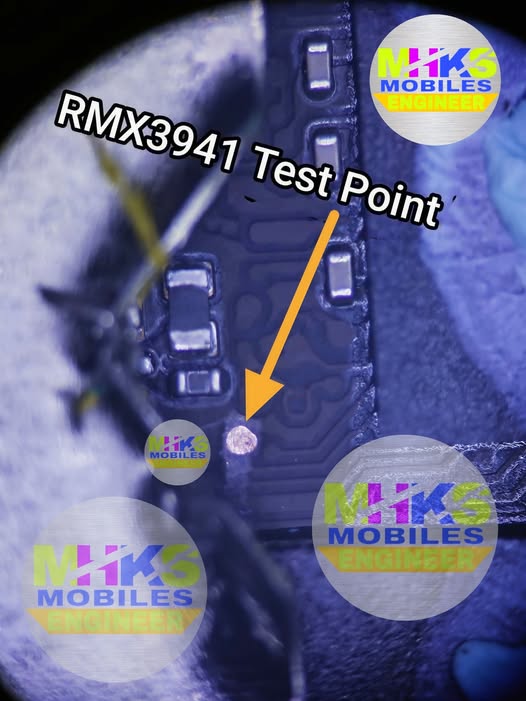
Here’s what’s currently documented for the Realme C75 (model RMX3941) test point — used to force the phone into BROM/MTK flash mode (helpful for FRP removal, unbricking, and deep flashing). These details are based on repair guides and community posts available online:
📍 What It Is
A test point on the Realme C75 motherboard is a small exposed PCB pad or group of pads that you short to ground in order to force the device into BROM (boot ROM) mode / Emergency Download Mode — a low-level hardware recovery mode supported by tools like SP Flash Tool, UnlockTool, UMT, Hydra, etc.
This mode is useful when:
- The phone is dead or not detected normally by USB
- You need to bypass FRP (factory reset protection)
- Normal fastboot or recovery won’t work
- Doing deep flash/unbrick operations
📌 Realme C75 RMX3941 Test Point Location
Important: There is no publicly shareable text diagram or exact coordinate map of the pads in text form — the available guides & videos show the test point via images only. This means that for precise hardware locations you need to view a board image, schematic, or video.
In general, the test point cluster for RMX3941 is shown on board-level guides near the bottom or edge region of the mainboard (close to the battery connector flex and USB area), but you must visually inspect the board with magnification to identify the exact pads.
🛠️ How It’s Usually Used
- Power the device off completely.
- Open the back cover and remove shields to expose the motherboard.
- Disconnect the battery connector for safety.
- Locate the test point pads on the board (refer to an image guide/video).
- Short the TP pad(s) to ground with a fine wire or tweezers.
- Connect via USB to a PC using a compatible repair tool.
- The phone should boot to BROM/MTK mode and be detected by the software.
📹 Video Guides
There are multiple video tutorials showing the test point method for Realme C75 RMX3941 (FRP removal, reboot to BROM, etc.), which visually highlight the test point pads:
⚠️ Notes & Warnings
- Exact pad names (TP1, TP2, etc.) and positions vary by board revision — visual confirmation is essential.
- If you don’t see the pads clearly, consider using microscope/magnifier + board schematic.
- This is hardware-level repair — not a software trick; do not attempt without proper tools and experience.
If you want, I can help locate a high-resolution image or annotated board photo of the Realme C75 RMX3941 test point so you can see exactly where the pad is — just let me know!