

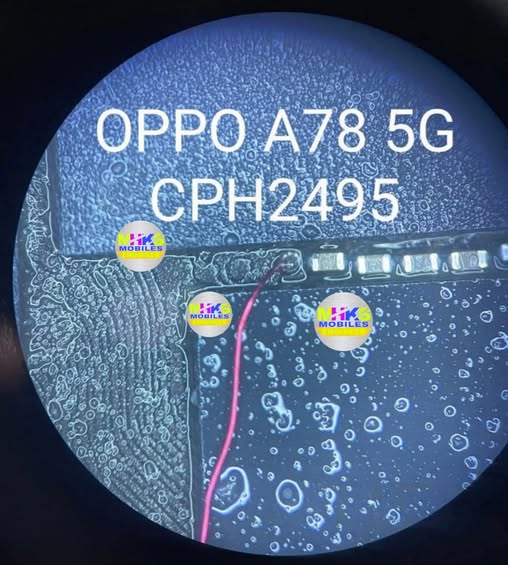
Here’s what test point refers to for the phones — this is hardware-level access on the motherboard used by technicians for deep recovery tasks (like entering EDL / BROM / unbrick / FRP bypass mode) when normal USB or button methods don’t work.
📌 What “Test Point” Means
- Test points are specific metal pads or tiny solder points on the phone’s motherboard.
- Shorting (connecting) these points to ground with tweezers or a wire while turning on/connecting the phone can force it into EDL/BROM/Download mode, letting software tools communicate with the device at a low level — used for flashing software, unbricking, or bypassing security locks.
📍 Test Point Location (General Info)
There isn’t an official Oppo service schematic publicly available — and test point positions can vary by model and region — but from repair guides:
📌 For OPPO A78 4G (CPH2565)
- Two test points exist near the CPU on the mainboard.
- You typically need to remove the back cover and battery to see the motherboard.
- Shorting the test points with tweezers + connecting USB makes the PC show Qualcomm HS-USB QDLoader 9008 — meaning the phone is in EDL mode.
📌 For OPPO A78 5G (CPH2495)
- The test point(s) for EDL/BROM are on the motherboard, often near the USB port / chipset area.
- After disconnecting battery and exposing the PCB, you locate the marked test pads near critical ICs.
- Shorting the pad to ground before connecting USB forces the phone into deep mode for recovery.
⚠️ Important Safety & Practical Notes
❗ Not for casual users:
Opening the phone and touching test points can void warranty and risk permanent damage if done improperly.
⚡ Professional tools needed:
This is usually done with mobile repair tools like TSM Tool, SP Flash Tool, UMT, CMMTK2, etc. by trained technicians.
🔌 Disconnect the battery first:
Always disconnect the battery before shorting test points — otherwise short-circuiting could permanently damage the board.
🛠 Photos/Schematic:
Exact pad positions are typically shown in repair schematics or technician guides — these are available in repair forums or service manuals but not usually from official Oppo support.
If you tell me which version you have (4G vs 5G and model code like CPH2565 or CPH2495), I can try to find a diagram or specific pad image showing the exact test point locations.