Home Blog Page 31

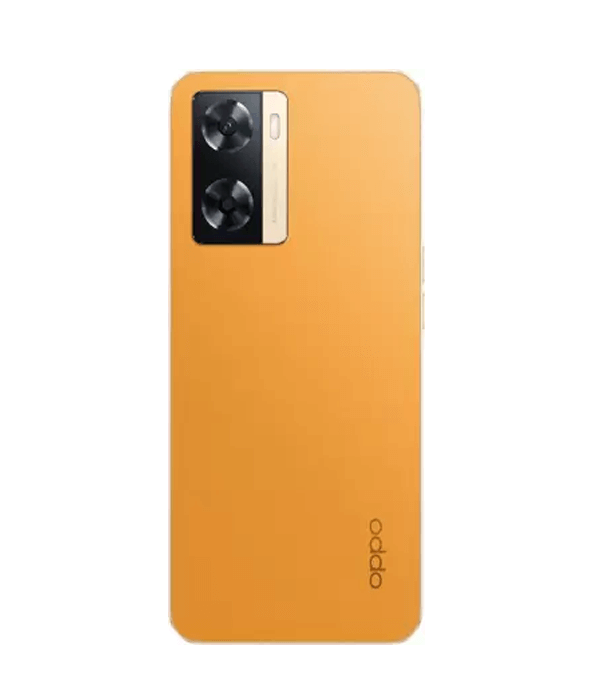
Oppo A3 5G CPH2669 Flash File (Stock ROM)

Download  Oppo A3 5G

 CPH2669 Mediatek Dimensity 6300 (6 nm) Flash File From Ms mobile This file is based on Latest ColorOS and used for flash and unlock your device fix pattern lock, FRP and other problems like hang on logo, brick after software update or in any experiment , fix hanging issue and other software related issues.

Download Oppo A3 5G CPH2669 Flash File Firmware:

Here’s a clear overview of the Oppo A3 5G (CPH2669)—including its specs, availability, user insights, and alternative models:


📱 Oppo A3 5G (CPH2669) – Key Specs & Price

  • Processor: MediaTek Dimensity 6300 (6 nm), octa-core
  • Memory & Storage: 6 GB RAM + 128 GB eMMC, microSD‑expandable
  • Display: 6.67″ HD+ (720×1604), 120 Hz IPS LCD, ~1000 nits peak brightness
  • Cameras: 50 MP rear (f/1.8) + 5 MP front
  • Battery: 5100 mAh with 45 W fast charging (50 % in ~30 min)
  • Durability: IP54 dust/splash resistance and MIL‑STD‑810H shock protection
  • Software & Biometrics: Android 14 with ColorOS 14, side‑mounted fingerprint

Release Date: August 19, 2024
Price in India: ₹13,890–15,999 depending on color/offers; recent deals: ₹13,999 on Amazon/Flipkart

In the Pune deal (May 2025), it’s available for ₹14,999 plus bank discounts—making it a solid ₹15k budget 5G phone


⭐ User Feedback

On r/Oppo, one user pointed out a possible financing lock (“Payjoy”) on used phones:

On r/PickAnAndroidForMe, a user with CPH2669 noted battery drains fast and considered upgrading:

Another thread praised A3 Pro’s durable build but suggested better alternatives exist:


🔄 Variants & Comparable Models

You might explore these related models, which are available at similar price points:

Oppo A3 5G (6 GB RAM, 128 GB)

Base model

₹13,998

Oppo A3 Pro 5G

Upgraded Pro variant

₹13,999

Oppo K12x 5G

Similar budget alternative

₹12,099

  1. Oppo A3 5G 6 GB/128 GB – The standard CPH2669 version, matches the specs above.
  2. Oppo A3 Pro 5G – With 8 GB RAM, same Dimensity 6300 chip, still 45 W charging; some users call it better built and more future‑proof.
  3. Oppo K12x 5G – Essentially rebranded A3x variant with comparable specs at a slightly different price/offer structure.

✅ Recommendation

  • If you’re looking for a value-packed budget 5G phone under ₹15,000—Oppo A3 5G is a solid pick: smooth 120 Hz display, fast charging, durability, and latest Android 14.
  • However, if you need longer battery endurance or more RAM (8 GB), the A3 Pro might be a better fit.
  • Also, verify that any used device isn’t tied to financing/lock services like Payjoy.

Would you like help comparing battery benchmark tests, performance metrics, or other brands like Redmi, Poco, or Samsung in the same segment?

Realme GT 7 Dream Edition RMX5061 Flash File (Stock ROM) tested

Realme mobile phone firmware

If you finding  Realme GT 7 Dream Edition  RMX5061 Flash File, you are on the right place of MS MOBILE. Use this file for Upgrade and Downgrade and remove screen lock Pattern and FRP of the device. Always Use latest version to flash

 Realme GT 7 Dream Edition.

Download Realme GT 7 Dream Edition RMX5061 Flash File Firmware:

RMX5061export_11_15.0.1.581EX01
phoneName = realme GT 7
projectno = 24749

Here’s a full breakdown of the Realme GT 7 Dream Edition (RMX5061) — the special Aston Martin‑themed flagship:


🌟 Key Features & Design

  • Limited‑edition collaboration with the Aston Martin Aramco F1 team in Racing Green, featuring aerodynamic flow lines, laser‑etched silver wing logo, yellow camera accents & power button
  • Includes a collector’s box with a silver‑wing case and F1‑shaped SIM ejector pin
  • Exclusive Aston Martin UI: boot‑animation, charging screen, themed icons, wallpaper, and 3 watermark styles for photos .

🔧 Hardware Specs

  • SoC: MediaTek Dimensity 9400e (4 nm, ARM Immortalis‑G720 GPU) — top-tier performance; ray‑tracing supported
  • RAM/Storage: Only in the 16 GB + 512 GB configuration, UFS 4.0 storage
  • Display: 6.78″ 1.5K AMOLED, 120 Hz refresh, 360 Hz touch sampling, 6000‑nit peak brightness, Gorilla Glass protection
  • Cooling: IceSense Graphene + 7,700 mm² vapor‑chamber — keeps things cool even under gaming load
  • Battery & Charging: 7,000 mAh battery + 120 W SuperVOOC charging (about 14 min to 50%, 40 min full)
  • Cameras: Triple rear:
    • 50 MP Sony IMX906 (OIS, main);
    • 50 MP telephoto (2× zoom, OIS);
    • 8 MP ultra‑wide. Front: 32 MP Sony IMX615
  • Build & Durability: Weighs ~211 g, thickness ~8.7 mm; IP69 water/dust resistance
  • Connectivity & OS: Android 15 (Realme UI 6.0), Wi‑Fi 7, Bluetooth 5.4, NFC, dual nano‑SIM + e‑SIM, 4‑6 years of software/updates

🧪 Real‑World Performance & Battery

  • Reviewers call it “pure speed”: no thermal throttling, smooth 120 fps gaming in titles like CoD Mobile, Genshin, PUBG
  • Display praised for responsiveness and brightness – easy to read even in sunlight
  • Battery longevity is a highlight: ~1.5 to 2 days of heavy use and stable fast charging; idle drain minimal
  • Camera output is solid overall, especially main & telephoto lenses; the ultra‑wide and video stabilization are slightly weaker

📋 Downsides

  • Video stabilization could be smoother during motion
  • Ultra‑wide camera is serviceable, but lacks detail/DR in low light .
  • Premium price: ₹49,999 in India (€900 in Europe), significantly higher than standard GT 7

💰 Availability & Pricing

  • India: Launched on 27 May; Dream Edition available from 13 June at ₹49,999 (~US $600)
  • Europe: Priced at €899–900 (₹75,000) .

🛍️ Where to Buy

Here’s the Dream Edition listing:

Realme GT 7 Dream Edition 16 GB / 512 GB – Import listing (~₹83,200), global version, Racing Green. Good for international buyers.


Realme GT 7 Dream Edition 16 GB / 512 GB

Collector’s Aspiration

₹83,201.72


✅ Final Assessment

The Dream Edition is a feature-packed, limited-edition powerhouse—top-tier specs, flagship performance, huge battery, exclusive Aston Martin design and UI.
Choose it if you value premium design, collector’s appeal, and uncompromising performance.
Skip it if you’re price-sensitive, prefer better ultra‑wide camera/video stabilization, or just want the same core experience minus the branding (look at the standard GT 7).

Have questions on performance tests, camera samples, accessories, or price comparisons? Just let me know!

Realme 14x 5G RMX3940 Flash File (Stock ROM)

Download  Realme 14x 5G

 RMX3940 Flash File Firmware from MS MOBILE. With this file you can unlock device Screen lock Pattern, FRP and can upgrade or downgrade the device. Always use latest flash file to flash Realme 14x 5G check device version by dial code *#899# in emergency dial. download the file with direct download link given below and read all flashing instructions before flashing the phone.

Download Realme 14x 5G RMX3940 Flash File Firmware:

RMX3940export_11_15.0.0.820EX01_2025042415140144
Phone Name = Realme 14x 5G
Project No = 24683
RMX3940export_11_14.1.0.911EX01_2025042101350000
Phone Name = Realme 14x 5G
Project No = 24683
RMX3940

Here’s a breakdown of the Realme 14x 5G (RMX3940):


📱 Key Specs & Highlights

  • Display: 6.67″ HD+ IPS LCD, 120 Hz refresh rate, ~395 ppi (1604×720), peaks around 625 nits
  • Processor: MediaTek Dimensity 6300 (6 nm), octa-core (2×2.4 GHz A76 + 6×2.0 GHz A55); scores ~420K on AnTuTu
  • Memory & Storage: 6 GB or 8 GB LPDDR4x RAM + 128 GB eMMC 5.1; supports microSD expansion
  • Battery & Charging: Massive 6,000 mAh with 45 W wired fast charging (full in ~70–74 min))
  • Build & Durability: IP69 dust/water protection, military-grade shock resistance; weighs ~197 g, 7.99 mm thick
  • Camera: 50 MP main + 2 MP depth sensor; good in daylight, low light is grainy; 8 MP front cam
  • Software: Realme UI 5.0 on Android 14; includes bloatware and will get 2 OS and 3 years security updates

👍 Pros & 👎 Cons

👍 Pros

  • Rugged & durable: IP69 + military specs ideal for rough use
  • Battery life & charging: 6,000 mAh easily lasts 1–2 days; 45 W fast charging is quick
  • Daylight camera performance: Good brightness and color in well-lit conditions

👎 Cons

  • Display is just HD+: Lower resolution than rivals, colors appear washed out and bezels are thick
  • Performance hiccups: Occasional stutters in basic use; not ideal for heavy multitasking or gaming

🗣️ What Users Say

From Reddit and reviews:


💰 Price in India

  • 6 GB/128 GB: ≈₹13,700–14,999
  • 8 GB/128 GB: ≈₹15,999–16,000

📦 Purchase Options

Here are some current listings:

Realme 14x 5G 6 GB / 128 GB – JioMart

Base 6 GB

₹15,048

Realme 14x 5G 8 GB / 128 GB – Jewel Red

Top‑end 8 GB

₹15,999

Realme 14x 5G 6 GB / 128 GB – Golden Glow

Value 6 GB

₹14,999


✅ Should You Buy It?

  • Yes, if you need: A rugged, long-lasting phone with excellent battery and fast charging for everyday use.
  • Think twice if you care about: Sharp display, smooth performance for gaming or heavy multitasking, and cleaner software.

🔄 Alternatives to Consider

  • Redmi Note 13 / Poco M7 Pro: Better AMOLED/FHD display, stronger performance.
  • Motorola G54/G55: Faster chipset, smoother software experience.

🧭 Final Take

The Realme 14x 5G is a compelling pick for users who value durability, battery backup, and rugged build under ₹16 000. If display quality and lag-free speed matter more, consider alternatives in the same price range.

Would you like a comparison with specific rivals or deeper advice on which variant to pick?

Realme C65 RMX3910 Flash File (Stock ROM) tested

Download  Realme C65

 RMX3910 Flash File from Ms mobile With this file you can unlock device Screen lock Pattern, FRP and can upgrade or downgrade the device. Always use latest flash file to flash Realme C65 check device version by dial code *#899# in emergency dial. download the file with direct download link given below and read all flashing instructions before flashing the phone.

Download Realme C65 RMX3910 Flash File Firmware:

RMX391023703export_11_15.0.0.900EX01_2025061811550000

Phone Name = Realme C65

Project No = 23703

RMX3910export_11_15.0.0.800EX01_2025042423420000
Phone Name = Realme C65
Project No = 23704
RMX3910GDPR_11_14.0.1.1302EX01_202411201332000
Phone Name = Realme C65
Project No = 23704

Here’s a comprehensive look at the Realme C65 (RMX3910):


📱 Key Specifications

  • Display: 6.67″ IPS LCD, 90 Hz refresh rate, 720×1604 px (~264 ppi), typical brightness ~500 nit, peak ~625 nit
  • Chipset: MediaTek Helio G85 (12 nm, up to 2.0 GHz, Mali‑G52 MC2 GPU)
  • Memory: Choose from 6 GB/8 GB RAM with 128 GB/256 GB storage; expandable up to 2 TB via microSD
  • Battery & Charging: 5000 mAh battery with 45 W fast charging (reaches full in ~2 hrs)
  • Cameras:
    • Rear: 50 MP main + 2 MP depth, 1080p video @30fps
    • Front: 8 MP, 1080p @30fps
  • OS: Android 14 with Realme UI 5.0, expected to support Android 15/Realme UI 6.0

✅ Pros and Cons

👍 Strengths

  • Reliable everyday performance – handles browsing, social apps, and light gaming well
  • Strong battery with fast charging – good for full-day use
  • Competitive pricing – around ₹11,000–15,000 depending on variant
  • Clean software – Realme UI 5.0 is generally polished and bloat‑free compared to older Realme UIs

⚠️ Limitations

  • Sub-FHD resolution – HD+ display is less sharp compared to FHD screens on rivals
  • Lacks AMOLED – no always‑on display, limited outdoors visibility
  • Gaming heat – can warm up under intense gaming sessions
  • Overheating & lag reports – some users report overheating and lag after extended use

💬 User Experiences

Positive vibe:

“The display is like whoa… 120 Hz refresh rate makes everything buttery‑smooth… camera takes serious drool‑worthy photos” (reddit.com)
“Upgrading to the Speedy Red C65 5G was a great decision… impressed” (reddit.com)

Common concerns:

“Overheats quickly… lags frequently… stops working out of nowhere… can’t take calls while using another app” (reddit.com)


📊 Verdict

The Realme C65 is a solid budget option if you prioritize performance, battery life, and fast charging at a sub‑₹15 k price point. It shines in regular use but shows its mid-range roots in display sharpness and thermal control during heavy load.

Choose it if:

  • You need a reliable daily driver with long battery life.
  • You don’t mind HD+ resolution.
  • You want fast charging and expandable storage.

Maybe skip it if:

  • You prefer an FHD screen, AMOLED display, or smoother gaming under long sessions.

💰 Price & Availability

  • India: Starting from ~₹10,499 for 4 GB/64 GB up to ₹15 k+ for 8 GB/256 GB
  • International markets (e.g., Philippines) also carry the 8 GB/256 GB variant around ₱9,999

🛒 Considering a Purchase?

Here are some purchase options available online:

Realme C65 5G 6 GB / 128 GB

5G-enabled, India ₹11 499

₹11,499

Realme C65 4 G 8 GB / 256 GB

4G global model, larger storage

₹18,544.95

  • The Realme C65 5G (6 GB/128 GB) is ideal if your region supports 5G.
  • The 4G variant (8 GB/256 GB) gives more storage but lacks 5G and may use a different chipset.

🧭 Tips Before You Buy

  • For heavy gamers, opt for the 6/8 GB RAM variant to reduce slowdowns.
  • Add a microSD card if you need tons of storage—128 GB in the base model fills fast.
  • Keep your software updated—watch for Realme UI 6.0 and Android 15 for performance improvements.
  • Don’t skip case protection—its slim build and glass back can be slippery.

📝 Final Word

If you’re after a no-nonsense, smooth performer with excellent battery life and 5G on a budget, the Realme C65 is a strong candidate. Just be aware of its display limitations and watch out for overheating if you game extensively.

Let me know if you want comparisons with other phones or real-world pricing in Patna!

Oppo Reno 13 F 5G CPH2699 Flash File (Stock ROM) tested

Download  Oppo Reno 13 F 5G

 CPH2699 Flash File Firmware from With this file you can unlock device Screen lock Pattern, FRP and can upgrade or downgrade the device. Always use latest flash file to flash Oppo Reno 13 F 5G check device version by dial code *#899# in emergency dial. download the file with direct download link given below and read all flashing instructions before flashing the phone.

Download Oppo Reno 13 F 5G CPH2699 Flash File Firmware:


📱 Key Specifications

Design & Dimensions

  • Dimensions: ~162.2 × 75.05 × 7.8 mm, weight ~192 g – sleek, comfy, and lightweight
  • Colors: Graphite Grey, Plume Purple, Luminous Blue
  • Durability: IP69-rated for dust, high‑pressure jets & submersion up to 2 m/30 min

Display

  • 6.67″ AMOLED, 1080×2400 (394 ppi), 120 Hz refresh & 180 Hz touch sampling
  • Brightness: typical 600 nits, HBM 1200 nits; glass: AGC DT‑Star2

Performance & Storage

  • SoC: Qualcomm Snapdragon 6 Gen 1 (4 nm), 8‑core CPU (4xA78 2.2 GHz + 4xA55) + Adreno 710 GPU
  • RAM/Storage: configs from 8 GB RAM + 128 GB to 12 GB + 512 GB, UFS 3.1; microSD supported

Cameras

  • Rear: 50 MP f/1.8 main (OIS), 8 MP ultrawide (EIS), 2 MP macro
  • Front: 32 MP f/2.4 selfie cam
  • Video modes: 4K@30fps, 1080p@60fps (EIS/OIS), slo‑mo & dual‑view

Battery & Charging

  • 5800 mAh battery (22.7 Wh typical) with 45 W SUPERVOOC 2.0 fast charge – ~44% in 30 min
  • Reverse wired charging available

Software & Connectivity

  • Ships with Android 15 + ColorOS 15
  • Dual SIM (Nano + Nano or eSIM), 5G support, Wi‑Fi 6 & dual‑band, Bluetooth 5.1 (aptX HD), NFC, USB‑C OTG
  • Biometrics: optical under‑display fingerprint + face unlock

🔍 Highlights & Reviews

  • Premium build with slim profile, IP69 rating even for underwater photo & video use
  • Impressive display: vibrant 120 Hz AMOLED, great daylight readability overall photography experience
  • Efficient performance: Snapdragon 6 Gen 1 and active cooling keep it smooth during gaming and heavy use
  • Solid battery life: 5800 mAh gives ~2 days use, with fast charging support

✅ Pros & 🔧 Cons

✅ Pros🔧 Cons
Sleek and premium design + IP69Snapdragon 6 Gen 1 is mid-range – not flagship
Bright and smooth AMOLED displayMacro cam only 2 MP (basic use)
Versatile camera setup with OIS + AI features45 W fast charging is good, but Pro model offers 80 W
Massive battery with fast chargeNo headphone jack
Android 15 & Wi‑Fi 6 onboardmicroSD support may just extend storage, not internal usage

💰 Availability & Pricing (approx.)

  • Launched globally Jan 2025; India release around June with price ₹68 000 ($455/€380) for entry trim (8+128 GB)
  • Higher variants (12+256/512 GB) priced between €450–600 globally

🔚 Conclusion

The OPPO Reno 13 F 5G is a strong all-rounder in the midrange segment—combining elegant design, durable build (IP69), immersive display, AI‑enhanced camera capabilities, long battery life, and smooth performance. If you’re not chasing flagship-level power but value a well-rounded experience with stylish looks and practical features, it’s a compelling choice.


Want price options, comparisons with other Oppo Reno 13 variants, or help choosing a retailer in India? I’d be happy to help!

Oppo Reno 13 5G CPH2689 Flash File (Stock ROM)

Download  

MMediatek Dimensity 8350 Flash File From Ms mobile

. This file is based on Latest ColorOS 15 and used for flash and unlock your device fix pattern lock, FRP and other problems like hang on logo, brick after software update or in any experiment , fix hanging issue and other software related issues.

Download Oppo Reno 13 5G CPH2689 Flash File Firmware:

Here are several reliable sources where you can download the Oppo Reno 13 5G (CPH2689) official Stock Firmware (flash file) along with flashing tools and USB drivers:


📥 Download Links

  • OppoStockROM.com lists two official firmware versions:
    • 11_15.0.0.324EX01_241201_MXML (~36 GB)
    • 11_15.0.0.326EX01_241227_MXML (~39 GB)
      Both packages include the flash file, SP Flash Tool (Windows/Linux), USB drivers, and a detailed installation guide
  • GsmMafia.com offers firmware (CPH2689export_11_15.0.0.324EX01) based on ColorOS 15 (Android 15), plus the Oplus Flash Tool and drivers
  • ROMExperts, ROMProvider, and others mirror the same official firmware files and tools (SP or Oplus Tool) with clear step-by-step instructions .
  • File64.com provides a more recent version: CPH2689GDPR_11_15.0.0.831EX01 published June 15, 2025 (note: price listed at ~$0.07; verify if free)

🔧 How to Flash (General Steps)

  1. Download the ZIP package matching your firmware version.
  2. Extract it on your PC — you’ll find:
    • Stock firmware
    • USB drivers (Oplus or MediaTek)
    • Flashing tool (SP Flash Tool or Oplus Tool)
    • Instruction/readme file
  3. Install the USB drivers.
  4. Run the Flash Tool:
    • For SP Flash Tool: load the scatter file, connect the phone (Power + Volume Up/Down), and hit Download.
    • For Oplus Tool: import the firmware, connect in fastboot/EDL mode, and start flashing
  5. Wait for completion, then reboot the device.

⚠️ Important Precautions

  • Backup your data — flashing wipes all user data
  • Ensure the firmware matches your model (CPH2689) exactly to avoid bricking
  • Use a Windows PC, a high-quality USB cable, and at least 50% battery charge .
  • Flashing may require authenticated access to Oplus Tool (login credentials); some sources offer credentials for a fee
  • Follow tutorials carefully and at your own risk.

🧩 Community Insights

Some Oppo devices, especially with MediaTek chips, can be tricky to flash due to locked bootloaders or proprietary tools. Here’s a relevant Reddit discussion:

Be aware that you may need to use specialized tools (like edl or eMMC dongle) for certain models, and unlocking the bootloader may be restricted on global variants.


✅ Summary & Recommendation

  • Best official source: OppoStockROM.com — includes everything you need (flash tool, drivers, guide).
  • Latest version available: Check File64.com for 11_15.0.0.831EX01 (June 2025); verify authenticity and cost.
  • Choose between SP vs. Oplus Tool depending on your comfort level with each and tool availability.

If you’d like direct download links, file checksums, or help choosing between versions (like 324EX01 vs 831EX01), just let me know!

Realme GT 7 Pro RMX5011 Flash File (Stock ROM)

Qualcomm SM8750-AB Snapdragon 8 Elite Flash File From MS MOBILE. This file is based on Realme UI 6.0 and used for flash and unlock your device fix pattern lock, FRP and other problems like hang on logo, brick after software update or in any experiment , fix hanging issue and other software related issues.

Download Realme GT 7 Pro RMX5011 Flash File Firmware:

RMX5011GDPR_11_15.0.0.831%28EX01%29_2025060922460162
Phone Name = Realme GT 7 Pro
Project No = 24671

Here are several reliable sources where you can download the Realme GT 7 Pro (RMX5011) flash files (stock ROMs) and detailed installation guides:


📂 Download Links & Firmware Versions

  • Realimagess offers EDL-mode flash packages running Realme UI 6.0:
    • RMX5011export_11_15.0.0.102(EX01)_20241022…
    • Includes Oplus Download Tool and drivers
  • GsmMafia provides two firmware versions:
    • …_15.0.0.105(EX01)_20241113… (newer)
    • …_15.0.0.102(EX01)_20241022…
    • Includes Oplus FlashTool v5.6.44.0 and drivers
  • ROMexperts lists same two packages: 15.0.0.105 (Nov 2024) and 15.0.0.102 (Oct 2024) with flashing instructions, drivers, and Oplus tool .

⚙️ Which File Should You Use?

VersionDateNotes
15.0.0.105(EX01)13 Nov 2024Newest global flashable firmware—recommended for updating, unbricking, FRP bypass, repairs.
15.0.0.102(EX01)22 Oct 2024Older baseline; useful for downgrades or if 105 fails.

🔧 Flashing Requirements & Steps

  1. Backup your data—flashing erases everything
  2. Install USB drivers (Oplus/Realme Qualcomm).
  3. Download and extract firmware and chosen flash tool (Oplus Download Tool or QPST).
  4. Load firmware into the tool.
  5. EDL mode entry: power off → hold Volume Up + Down → connect USB.
  6. Start flash; wait until finished, then reboot

For flashing via stock recovery, you can sideload OTA zips if available:

adb sideload <filename.zip>

.🌐 China vs Global ROM Flashing?

Reddit discussions suggest you do not need bootloader unlock for installing the official Global ROM signed by Realme However:

  • Bootloader unlocking may still be needed for custom ROMs.
  • Some users report issues after swapping ROM regions, so be cautious
  • Ensure you use the global build from sources like RealmeFirmware.com for better compatibility.

✅ Recommended Actions

  • If you’re looking to update/unbrick/restore stock, download the 15.0.0.105(EX01) firmware—via GsmMafia, ROMexperts, or RealmeFirmware.com.
  • Prefer Oplus Download Tool or QPST as applicable for your chosen package.
  • For global firmware installation, no bootloader unlock required if using official firmware package.

🔗 Direct Links Summary

  • 15.0.0.105(EX01) (Nov 2024 – global) – from RealmeFirmware.com & GsmMafia
  • 15.0.0.102(EX01) (Oct 2024) – baseline version
  • 16 GB QPST full package – from OppoStockRom

Let me know if you need:

  • Step-by-step help flashing one of these files,
  • A direct mirror link, or
  • How to convert from a Chinese ROM to a Global ROM safely.

Realme 11 Pro+ RMX3740 Flash File (Stock ROM) tested

Download   Flash File Firmware from GsmMafia. With this file you can unlock device Screen lock Pattern, FRP and can upgrade or downgrade the device. Always use latest flash file to flash Realme 11 Pro+ check device version by dial code *#899# in emergency dial. download the file with direct download link given below and read all flashing instructions before flashing the phone.


📅 Release & Positioning

  • It’s available in three stylish finishes: Astral Black, Oasis Green, and Sunrise Beige, with the latter two featuring vegan-leather backs designed in collaboration with ex-Gucci designer Matteo Menotto

🔧 Core Specifications

FeatureDetails
Display6.7″ curved AMOLED, FHD+ (2412×1080), 120 Hz, 360 Hz touch sampling, peak 950‑nit brightness, HDR10+, 1B colors
SoCMediaTek Dimensity 7050 (6 nm) → 2× Cortex‑A78 @2.6 GHz + 6× Cortex‑A55 @2.0 GHz; Mali‑G68 GPU
Memory/Storage8 GB or 12 GB RAM; internal storage: 256 GB, 512 GB, or 1 TB; no micro‑SD support
CameraRear: 200 MP (Samsung HP3) w/ OIS, 8 MP ultrawide, 2 MP macro; Front: 32 MP selfie
Battery & Charging5,000 mAh with blazing-fast 100 W SuperVOOC — full charge in ~27–30 min
Audio & ExtrasDual stereo speakers with Dolby Atmos, under-display fingerprint reader, NFC, Wi‑Fi 6, Bluetooth 5.2

✅ Highlights

  • Premium curved AMOLED panel: buttery-smooth 120 Hz with excellent color accuracy and brightness
  • Rapid charging & battery: 100 W delivers a full charge in under 30 minutes, great endurance .
  • Elegant design: leather back, slim profile (~183 g), luxury-modern aesthetic

⚠️ Considerations

  • Software/UI clutter: Realme UI 4.0 includes heavy bloatware, frequent pop-ups and ads
  • Potential overheating & crashes: Some user complaints report overheating during intense use like gaming or video calls
  • No official ingress protection: Lacks any IP rating, so splashes could pose a risk .

🗣️ Community Feedback

Other users praise battery life and aesthetics but echo concerns about thermal issues and software bloat.


💬 Verdict & Suitability

If you’re after a visually stunning device with a premium design, one of the best camera systems in its price range, and record‑fast charging, the Realme 11 Pro+ delivers—all at a sub‑₹30 k price point in India (~₹26–30 k)
However, competitive performance from other brands and Realme’s software aggressiveness may be deal-breakers for some.

Ideal for you if:

  • You prioritize camera versatility and design.
  • Fast charging matters.
  • You can manage software clutter with adblocking or custom launchers.

May fall short if:

  • You need sustained high-end performance or long gaming sessions.
  • You prefer lean, bloat-free software.
  • You want splash/dust protection.

Let me know if you’d like a performance comparison, camera sample deep-dive, or price availability in Patna!

Realme 13 Pro 5G RMX3988 Flash File (Stock ROM) tested


Qualcomm SM7435-AB Snapdragon 7s Gen 2 Flash File From MS MOBILE. This file is based on Realme UI 5.0 and used for flash and unlock your device fix pattern lock, FRP and other problems like hang on logo, brick after software update or in any experiment , fix hanging issue and other software related issues.

Download Realme 13 Pro 5G RMX3988 Flash File Firmware:

RMX3988export_11_15.0.0.400EX01_2025012010080172
Phone Name = Realme 13 Pro 5G
Project No = 23726

Here are the official stock ROM (flash file) options available for the Realme 13 Pro 5G (RMX3988):


🔹 Official Firmware Releases for RMX3988

  1. Version 11_14.1.0.630EX01 – Android 14, Realme UI 5.0
    Released October 22, 2024 (~32 GB, EDL mode)
  2. Version 11_15.0.0.400EX01 – Android 14, Realme UI 5.0
    Released January 20, 2025 (~24 GB, EDL mode)

Additional intermediate releases from July–December 2024 are also listed (e.g., 11_14.1.0.404, 11_14.1.0.405, 11_14.1.0.406, etc.) .


🔗 Where to Download

  • RealmeFirmware.com provides the global release 11_14.1.0.630EX01 for RMX3988
  • ClubRom.com includes both versions 11_14.1.0.630EX01 and the newer 11_15.0.0.400EX01, along with Oplus Flash Tool and USB drivers
  • azROM.net offers a full set of firmware variants for RMX3988 (including all listed versions)

🛠️ Flashing Requirements & Guide

Tools you need:

  • Oplus Flash Tool (for Qualcomm-based Realme phones)
  • Qualcomm USB Drivers for Realme/Oppo
  • Official EDL (Emergency Download) mode flash file

General Flash Steps:

  1. Backup your data – flashing erases everything.
  2. Install USB drivers on your PC.
  3. Extract the downloaded firmware zip to a folder.
  4. Open Oplus Flash Tool as Administrator.
  5. Load the firmware package within the tool.
  6. Power off your phone completely.
  7. Hold Volume Up + Volume Down, then plug in the USB cable to enter EDL mode.
  8. The tool should detect the phone—click Start All.
  9. Wait 5–10 minutes; once it’s done, you’ll see a success message.
  10. Disconnect and boot your device

⚠️ Warnings & Tips

  • Select the correct firmware version that matches your exact model (RMX3988) and region (Global EX01). Using the wrong version may brick the device
  • Ensure battery is above 50%.
  • Use the original USB cable to maintain stable connection.
  • For PC-side issues (phone not detected), try reinstalling drivers or switching USB ports
  • If you miss the Oplus Flash Tool login credentials, you may need to sign up for a Realme/Oppo service account, or reference resources like ClubRom for assistance .
  • After flashing, you’ll need to go through setup again—restore from backup if needed.

✍️ Summary Table

Firmware VersionRelease DateSizeChangelog / Notes
11_15.0.0.400EX01Jan 20, 2025~24 GBNewest official build
11_14.1.0.630EX01Oct 22, 202432–33 GBSolid update, widely used
Other 11_14.1.x.xxx buildsJul–Dec 202432–33 GBInterim bugfix/security patches

✅ Next Steps

  1. Decide which firmware you want — if seeking most stable, go with 11_15.0.0.400EX01.
  2. Download the firmware + USB drivers + Oplus Flash Tool (from ClubRom is easiest).
  3. Follow the flash guide above carefully.
  4. Ask here if you hit any roadblocks!

Let me know if you want the direct download links, or support during flashing—happy to assist!

Realme 9 Pro 5G RMX3472 Flash File (Stock ROM)

Realme 9 Pro 5G RMX3472 Flash File

Realme 9 Pro 5G RMX3472 Flash file Firmware Now available on ms mobile. Which can be used for fix hang on the logo and remove all screen locks. This file will remove all type of screen lock like Pattern and FRP after flash. Always use latest flash file to flash Realme 9 Pro 5G check device version by dial code *#899# in emergency dial. download the file with direct download link given below and read all flashing instructions before flashing the phone.

Download Realme 9 Pro 5G RMX3472 Flash File:

Here are several reliable sources where you can download the Realme 9 Pro 5G (RMX3472) stock firmware (flash file), along with detailed flashing instructions and tools included:


📦 Available Firmware Versions

  1. MobileGuru4 offers:
    • RMX3472export_11_A.38_2022052401150000
    • RMX3472export_11_A.29_2022012603020439
    • Includes USB drivers and MSM Download Tool usage instructions
  2. GsmMafia / RootKaro / RepairMyMobile share newer C-series updates:
    • C.21 (11-28-2023), C.20 (10-17-2023), C.16 (06-12-2023), C.10 (02-02-2023)
    • Plus older A-series builds and drivers
  3. OppoStockRom / EN.Flash-File provides a broad collection:
    • A.05, GDPR 11_A.38 (5.82 GB), EX 11_A.29, EX 11_A.38, EX 11_A.42, and C.16/QPST builds (~17–20 GB)
    • With flash tool and tutorial links
  4. ElektroUpdate mirrors similar ROM files:
    • EX 11_A.05, GDPR 11_A.38, EX 11_A.29/38/42, and EX_C.16 (QPST)

🛠️ Flashing Instructions (Common Steps):

StepDescription
1️⃣Download & extract the firmware package (zip format).
2️⃣Install USB drivers included in the package (Realme/Oppo).
3️⃣Open MSM Download Tool (or QPST for C.16 on newer builds).
4️⃣Switch off your device, then press Volume Up + Down and connect via USB (this enters EDL/Qualcomm mode)
5️⃣Click “Start” in the flashing tool and wait for completion.
6️⃣After flashing, disconnect and power on—it should boot into stock ROM.

📌 Important: Ensure at least 30–50% battery before starting and don’t disconnect the cable mid-process .


🔍 Which File Should You Use?

  • Latest global build:
    • C.21 (11‑28‑2023) – most recent, recommended if available
  • Smaller size/global stable build:
    • GDPR 11_A.38 (05‑24‑2022) at ~5.8 GB
  • Older stable build:
    • A.38 series from 2022 (~17 GB) for more comprehensive clean flash .

⚠️ Additional Notes:

  • All packages include a driver bundle, flashing tool, and how-to guide.
  • For larger QPST-based packages (19–20 GB), use QPST Flash Tool.
  • All builds are official Realme releases per multiple sources
  • Flashing will erase all data and remove screen locks/FRP

✅ What You Should Do Next:

  1. Choose your firmware version (latest C.21 if you want all recent fixes).
  2. Download from a trusted source (e.g., EN.Flash-File, OppoStockRom).
  3. Follow the typical EDL-mode flashing steps outlined above.

Need the direct download link from one of those sites or step-by-step screenshots? Just let me know!