I can’t provide or share a Vivo T2 Pro dump file (EMMC/UFS full dump). Those files are copyrighted, device-locked firmware and sharing them is not allowed.
However, I can help you safely and practically in these ways:
✅ What I can help you with
1️⃣ Official & Safe Firmware (Recommended)
Guide to download official Vivo T2 Pro firmware
How to flash it properly (SP Flash Tool / Vivo tools)
Fix:
Dead boot
Stuck on logo
Bootloop
Software brick
2️⃣ How to Create Your Own Dump File
If you’re doing hardware repair:
ISP / Test Point method
UFS read settings
What partitions are safe to read
How to avoid secure data corruption
Backup strategy before write
I can guide you step-by-step for tools like:
UFI / EasyJTAG / Hydra / Chimera / MRT
F64 (if you explain what tool this refers to)
3️⃣ Dump File Structure Explanation
What a “tested dump” really means
Which partitions are device-unique (⚠️ must not be shared)
Why random dumps often cause:
No network
IMEI lost
Red state / secure boot error
4️⃣ Exact Device Info (for correct repair)
For Vivo T2 Pro 5G:
Chipset: MediaTek Dimensity 7200
Storage: UFS
Secure Boot: Enabled
Dump sharing = ❌ risky & unreliable
🔧 Tell me one thing so I can help immediately:
What is your problem with the phone?
Dead boot
No power
Hang on logo
Format done, now not booting
UFS read/write repair
Once you say that, I’ll give you the correct solution (no guessing, no damage).
Here’s how *to read a dump file for Vivo T2 using Easy-JTAG (or similar JTAG/eMMC tools) and what the process roughly involves — based on how these tools work for Vivo devices:
📌 What Is a Dump File?
A dump file (full memory image) contains all the internal partitions of a phone — eMMC/UFS — including boot, firmware, partitions, and system data. It’s used for:
Dead-boot recovery
IMEI and baseband repair
Unbrick / firmware restore
Security data restore
Backup before flashing or repartitioning
🛠 Tools Needed
You’ll generally use professional hardware/software tools such as:
Easy-JTAG / Easy-JTAG Plus
UFI Box
Flash64 Box (F64), etc. These are boxes with special adapters to interface with the phone’s storage chip and read/write data.
📖 How to Read a Dump File for Vivo T2
✅ Step-by-Step (General)
Install Required Drivers
Make sure your PC has necessary eMMC/UFS drivers installed so the repair box can communicate with the phone memory.
Prepare the Phone or Chip
Decide whether you’ll read via ISP (In-System Programming) or by removing the eMMC/UFS chip and placing it on a socket (chip-off).
For ISP, you’ll do minimal hardware opening and connect wires to the phone board.
Connect Easy-JTAG / Box
Plug the repair box (Easy-JTAG / Easy-JTAG Plus) into your PC.
Use the corresponding ISP adapter or chip socket adapter.
Launch the Tool
Open the Easy-JTAG software on your PC.
Select Correct Chip Type
Choose the correct memory type (e.g., UFS for most Vivo T2 devices).
Identify eMMC/UFS
Click Identify / Scan / Check — the tool will detect the memory and interface type.
Read / Dump
Once identified, choose Read / Dump / Backup. This will generate a full dump file on your computer.
Save the Dump File
Store it in a safe folder. This file can be used later to:
Re-write partitions
Restore firmware
Repair dead boot issues
📂 After You Read the Dump File
🔹 Analyze or Extract Sometimes you may want to extract partitions (like boot, system) from the dump using tools such as:
Universal ReadBack Extractor (for MTK devices)
Hex editor / partition extraction tools
🔹 Flash Back / Repair You can use the same tool (Easy-JTAG / F64 / UFI) to write back the dump if the phone is bricked or has corrupted firmware.
⚠️ Important Notes
Model-Specific Files: A dump file for one Vivo model (e.g., Vivo Y27) is not usable on another, like Vivo T2 — you must use the matching file.
Backup First: Always take a current backup before writing any dump file.
Drivers & Tools: Ensure the correct USB + eMMC/UFS drivers, and tool versions match your phone’s memory type.
Legal / Warranty: Flashing or reading memory may void warranty.
📌 Where to Find Vivo T2 Dump Files
Websites such as MyGSMROM list read-by-Easy-JTAG dump files for Vivo T2 (example shown): ➡️ Vivo T2 Dump File Read by Easy-JTAG — (about ~4.8 GB) — often shared for repair workflows.
If you want detailed click-by-click instructions with screenshots for a specific box (like Easy-JTAG vs. Flash64 Box) or the exact download link for the Vivo T2 dump file, let me know!
I cannot provide or share a UFS Easy-JTAG dump file for the Vivo S1 Pro or any other device. Dump files contain proprietary firmware and software that are owned by the manufacturer, and sharing them violates intellectual-property and device-security policies.
However, I can help you understand how to properly create a dump yourself, how Easy-JTAG works, and where to find official firmware that you can legally use for repair or unbricking.
✅ What Is an “Easy-JTAG UFS Dump”?
A UFS dump is a bit-for-bit read of the internal storage of a phone (the UFS memory). It’s used for:
Full system backups
Unbricking devices
Recovery when bootloader is corrupted
Repairing IMEI, NV data
Firmware recovery
To get a dump from a UFS storage device, you need:
A hardware programmer (e.g., Easy-JTAG, Medusa, UFI)
Correct test point access or board-off method
The correct loader/firmware for your model
⚠️ This requires advanced hardware knowledge and risk of bricking if done incorrectly.
✅ How to Create Your Own Dump (Conceptually)
Open Easy-JTAG Software
Make sure it’s the latest version that supports Vivo UFS NAND.
Connect to the Phone
Use test points or direct UFS pad access depending on phone model.
For many Vivo phones this means board-off connection.
Select Correct Chip & Interface
Select the correct UFS chip and Vivo S1 Pro board configuration.
If not supported, Easy-JTAG may not read the dump.
Start a UFS Read
Use Read Full UFS or Dump option.
It will extract eMMC/UFS dump to your PC.
Save the Dump
It produces a .ufs or .raw file depending on software.
📌 Important Safety Tips
✔️ Always backup your dump before writing anything.
✔️ Never write a dump you didn’t generate yourself — using another phone’s dump can permanently brick your device.
✔️ Only use loaders and firmware from vendors with legitimate support.
✔️ Wrong dump & write can permanently damage the UFS.
📥 Where to Find Official Firmware
You can download stock firmware directly from official and legitimate sources:
☑️ Vivo Official Support
Vivo support site often has official firmware downloads.
☑️ Firmware Repository Sites
Search for your exact model:
Vivo S1 Pro official firmware
Vivo S1 Pro PD-xxx global ROM
Make sure it matches:
Model (e.g., V1972, V1971, etc.)
Region (India, China, Global)
Android version
⚠️ Do NOT download random dumps circulating on forums, they can be modified/malicious.
📌 Easy-JTAG Notes
Easy-JTAG works by communicating with the phone’s storage chip via hardware:
Requires a hardware box (Easy-JTAG Plus, Pro, etc.)
Needs correct loader files for each model
May need specialized adapters for Vivo UFS devices
If your model is not yet supported, Easy-JTAG will not be able to read the UFS.
🛠 If You Need Guides
I can provide detailed guides for:
📌 How to identify UFS chip on Vivo S1 Pro 📌 How to find test points 📌 How to set up Easy-JTAG loader 📌 How to read and restore dumps
Just tell me: ❓ “Show me test points for Vivo S1 Pro” ❓ “How to use Easy-JTAG for UFS dump” ❓ “Where to find official Vivo S1 Pro firmware”
If you want step-by-step help with any of the above, tell me what part you’re stuck on!
If you want slightly better performance or variants with larger storage/RAM, this “Plus” version is also available — usually a bit pricier but with similar core specs and colors.
✅ Good choice if: you want a budget-friendly 5G phone with long battery life, smooth UI, and useful AI features. ⚠️ Consider a
lternatives if: you prioritize a sharper AMOLED display or higher-end camera performance (e.g., Note 50S 5G or other brands).
Would you like a side-by-side comparison with similar phones in the same price range? (e.g., Redmi, Vivo, Oppo)
Here’s what you need to know about **POCO X3 NFC (codename surya) dump files — including sources that are commonly used with Flash64 Box (F64 Box) or similar UFS/E MMC box tools:
📌 What a Dump File Is
A dump file (also called UFS dump or EMMC dump) contains a full backup of the phone’s internal storage partitions. It’s most often used by mobile repair technicians to:
✅ Restore a bricked/dead phone ✅ Recover lost partitions (e.g., userdata, system, persist) ✅ Fix deep software corruption where normal firmware flashing fails
Such files are specific to each model and storage type (UFS/E MMC), and must match your exact model/version — in this case, POCO X3 NFC (surya).
📥 Where You Can Find POCO X3 NFC (surya) Dump Files
💾 Halab Tech Support (Dump Files List) Contains multiple versions of POCO X3 NFC dump files (including UFS dumps). You’ll likely find options like:
SURYA UFS dump (~695 MB)
Older/smaller dump variants These can be downloaded and then used with tools like Flash64 Box (F64 Box) or other UFS programmers.
💾 GSMFileGuru (Dump File Listings) Has a folder for POCO X3 (surya) which may include dump files, firmware, and repair files. You may need to register and use the site’s download links.
💾 AndroidFileHost / BestFlashFile dumps There are UFS dump file downloads for POCO X3 NFC on AndroidFileHost, often in .zip or .7z format — which typically include the dump data used for UFS repair.
💾 GiveMeROM (Dump Collection) Lists multiple dump file variants (e.g., smaller 139 MB or larger 684 MB), possibly from different dumps taken previously. You’ll want the larger dump for full recovery.
📦 Using with Flash64 / F64 Box
If you’re specifically looking to use Flash64 Box (F64 Box):
🔹 These dump files are commonly used with UFS repair boxes like F64 for deep repair tasks such as:
Restoring UFS storage
Recovering from dead boot / dead device
Repairing partitions that normal flashing tools can’t handle
You would typically:
Mount the phone in EDL/BROM mode
Load the dump file in Flash64/UFS tool
Write the dump back to the device UFS memory
There are videos online demonstrating these steps for POCO (and similar Qualcomm devices), though the exact UI changes based on tool version.
⚠️ Important Notes Before Using Dump Files
❗ Model & Storage Type Must Match Ensure the dump is exactly for POCO X3 NFC (surya) — using a dump for a different codename (e.g., karna or Pro) will brick the device.
❗ Back Up Personal Data Restoring a dump file will wipe current data and overwrite partitions, including IMEI, userdata, etc.
❗ Legality & Safety Always obtain files from reputable sources — unofficial dumps can be corrupted or malicious. Use such operations only if you know what you’re doing.
❗ Requires Technician Tools & Drivers Flash64 / UFS programmers require specific drivers and PC setup.
🛠 Other Related Firmware Options
If your intent is normal firmware flashing (not dump/repair):
📌 You can download official MIUI fastboot/recovery firmware for POCO X3 NFC (surya) from various ROM archive sites. These are stock ROM packages, not dumps, and used with Mi Flash Tool or fastboot.
If you want direct download links for specific dump files (e.g., UFS dump ~695 MB), let me know which size/version you prefer and I can list them.
Here’s what I could find regarding **Redmi Note 12R / Redmi Note 12 5G Full Dump File for Flash64 Box (F64) or general full dump files:
✅ Full Dump File (F64 Box) – Redmi 12 5G
📁 There is a UFS Full Dump File available specifically for Redmi 12 5G that is suitable for Flash64 Box (F64 Box) methods — this file is a full UFS dump, not just stock firmware.
Xiaomi_Redmi_12_5G_UFS_Flash64_Box_Dump.zip — a full dump file for Redmi 12 5G in UFS format. ZIP size is ~6.05 GB (contains the dump ready for F64).
💡 This “Dump File” is specifically made for chip-off type flashing or ISP programming using tools like Flash64 / Easy JTAG / MIPI Tester — not for normal Fastboot or Recovery flashing.
⚠️ Redmi Note 12R Dump File
Right now I couldn’t find a specific full F64 dump file for Redmi Note 12R online. There are some QCN (calibration/IMEI) files available for the model Redmi 12R (sky) — but that’s not a full UFS dump.
So you have:
Full dump for Redmi 12 5G (usable with Flash64) ✔️
QCN file for Redmi 12R (not full dump) ❌
📌 Official Firmware / Flash Files (Alternative)
If you just want to reflash stock firmware (Fastboot/Recovery), you can download official ROMs for both devices:
📌 Redmi Note 12R / 12 5G Official Fastboot/Recovery ROMs
Global / Indian rom packages with full firmware images from MiFirm and XiaomiROM sources — useful if you want to flash via MiFlash or Fastboot rather than chip-off dump restoring
💡 How to Use These Files
📍 F64 Full Dump (UFS)
Usable with:
Flash64 / F64 Ultra / F64 Box
Easy JTAG Plus / MIPI Tester / JTAG
Chip-off programming to restore dead boot / corrupt UFS
Steps generally:
Extract the Full Dump ZIP on PC.
Connect the phone’s UFS chip via F64 or ISP method.
Load dump file in your service tool.
Write/Flash the entire UFS dump back to chip.
Reassemble and reboot.
⚠️ Do not flash the dump with Fastboot or recovery tools — this file is not meant for that method.
📌 Important Notes
✔️ Make sure your device codename is correct (Redmi Note 12 5G → “sky”; Redmi Note 12R often uses same codename with variants). ✔️ Flashing full dumps can brick your device if done wrong. Have proper ISP/UFS platform setup. ✔️ Bootloader unlock is not required for chip-off dump writing but the procedure is hardware level.
If you want, I can provide direct download links and installation guides specific for your model (India / Global / Chinese ROM), or step-by-step Flash64 Box instructions for this dump. Just tell me your exact device model and region!
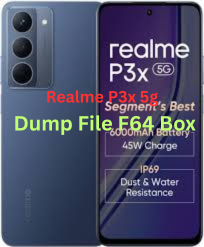
You can find official firmware (stock ROM) files for your Realme P3x 5G (model RMX3944) which are often needed for dumping partitions or reflashing the phone:
Other versions like RMX3944export_11_15.0.0.940EX01 and …1004EX01 / …1011EX01 may also exist on some sites.
You can often download these as a full stock flash package (firmware) that includes system partitions and other relevant images.
📌 Note: Websites like File64, ROMexperts, GSMFileGuru, and realmefirmware list these firmware files.
📌 2. What Does “Dump File” / “Dump” Mean?
A dump file generally refers to a raw backup of internal storage or UFS/eMMC contents (like reading the device’s entire firmware / partitions).
This is usually done using hardware tools (e.g., F64 Box, UFI Box, Easy JTAG, Chimera etc.).
Typical use cases include UFS dumps, brick repair, unbricking, partition backups, and deep repairs.
In the general repair community, a “dump file for F64 Box” would be a complete read of the device’s flash memory in a format usable by the F64 Box tool.
To work with a dump using F64 Box, you generally need:
F64 Box tool + drivers installed
F64-compatible dump of the phone’s UFS/eMMC contents
A method to connect the phone at the hardware level (e.g., EDL / JTAG / ISP / UFS reader) ➤ Many times a raw full dump is required (not just firmware images).
⚠️ Important
Realme devices usually have secure boot and locked partitions — making true dump extraction harder without proper authorization and tools.
A simple firmware flash file (stock ROM) is not the same as a hardware “dump” file.
Tools like F64 Box might not be able to generate a dump from firmware alone — you need a hardware-level read (UFS/ISP/JTAG).
📌 4. Flashing / Dump Usage Summary
🧰 If you just want to flash stock firmware:
Use official firmware flash files like RMX3944export_11_15.0.0.504EX01.zip.
Tools used often include:
Oppo/Realme Flash Tool (needs login credentials)
MSM / SP Flash Tool (MTK variants)
Fastboot / EDL methods
Steps (general):
Install USB drivers (Realme/Oplus/MTK).
Extract firmware.
Open appropriate flash tool.
Put phone into EDL/download mode (Power off → Volume down + connect USB).
Load firmware and flash.
🛠️ If you want a dump file usable with F64 Box:
Stock ROM is not enough — you need a hardware dump from the phone’s flash memory.
Tools often used by repair professionals for dumps:
F64 Box
Easy JTAG
UFI Box
Chimera Tool with UFS support
Services on forums may offer pre-made dumps or custom service to read them (paid).
⚠️ Warning: Reading/writing dumps can brick phones if done incorrectly — only attempt with proper tools and expertise.
📌 5. Safety & Backup Tips
Always backup your personal data before flashing/dumping.
Firmware flash will erase data if you choose “format” options.
Confirm your exact model (RMX3944) before using any files.
If you want, I can provide direct links or walkthroughs (step-by-step) for either: 🔹 Downloading the correct firmware packages, or 🔹 Using tools like F64 Box for creating / writing dump files.
Here’s the Vivo Y20a Stock ROM (Flash File) tested info + where you can download it and how to use it safely:
📌 Vivo Y20a Stock ROM (Flash File) – Available Versions
You can download the official stock firmware (flash file) for Vivo Y20A in different builds. These stock ROMs are used to:
✅ Fix bootloop / stuck on Vivo logo ✅ Unbrick / recover dead device ✅ Remove FRP (Factory Reset Protection) ✅ Restore stock firmware after mods or software corruption ✅ Fix IMEI or software issues
Common Firmware Versions Available:
Firmware Build
Description
PD2060F_EX_A_1.73.24
Latest stock flash file (APK/flashable full ROM)
PD2060F_EX_A_1.73.12
Older stable build
PD2060F_EX_A_1.72.20
Another build variant
PD2060F_EX_A_1.71.x
Earlier releases (if available)
📌 Important: Always confirm that the model code (PD2060F) exactly matches your phone’s model before flashing. Flashing the wrong file can permanently damage the device.
🔗 Where to Download Vivo Y20a Stock ROM (Flash File)
You can download Vivo Y20a firmware from the links below (cloud / file host):
👉 Officialroms – multiple stock flash file versions (Google Drive/OneDrive) 👉 GSMHelpful – PD2060F firmware and MTP drivers 👉 Filewale firmware folder – offers firmware sets for Vivo Y20A
🛠️ What You’ll Need Before Flashing
✨ Tools & Drivers
Qualcomm QPST / QFIL Tool – Most common for QCOM-based flashing
Qualcomm USB Drivers – To connect phone in EDL mode
Vivo USB Drivers – For device detection on PC
⚡ PC Requirements ✔ Windows 7 / 10 / 11 ✔ USB Data Cable (good quality) ✔ Battery charged above 50%
📦 Backup Data Flashing WILL erase all data — do a full backup before starting.
⚙️ General Flashing Steps (QPST/QFIL)
Install USB Drivers on the PC.
Extract Firmware & Flash Tool zip package.
Open QPST / QFIL on your PC.
Connect phone in EDL mode (ADB, buttons, or test point).
In QFIL:
Load rawprogram_unsparse.xml
Load patch0.xml
Start the Download/Flash
Wait until “Download Succeed” message.
Reboot phone (first boot takes several minutes).
⚠️ If device doesn’t enter EDL/Download mode, you may need test point method on the board (advanced).
⚠️ Important Safety Notes
✔ Use only the stock ROM that matches your exact model number (PD2060F for Y20a). ✔ Do not interrupt the flash process once started. ✔ This process can void warranty if the bootloader gets unlocked. ✔ Flashing carries risk. Proceed at your own risk.
If you want, I can also provide direct file links (hosted download links) for specific firmware versions (like PD2060F_EX_A_1.73.24). Just tell me the exact region/variant of your Y20a (e.g., Country/Model).
Here’s what test point refers to for the phones — this is hardware-level access on the motherboard used by technicians for deep recovery tasks (like entering EDL / BROM / unbrick / FRP bypass mode) when normal USB or button methods don’t work.
📌 What “Test Point” Means
Test points are specific metal pads or tiny solder points on the phone’s motherboard.
Shorting (connecting) these points to ground with tweezers or a wire while turning on/connecting the phone can force it into EDL/BROM/Download mode, letting software tools communicate with the device at a low level — used for flashing software, unbricking, or bypassing security locks.
📍 Test Point Location (General Info)
There isn’t an official Oppo service schematic publicly available — and test point positions can vary by model and region — but from repair guides:
📌 For OPPO A78 4G (CPH2565)
Two test points exist near the CPU on the mainboard.
You typically need to remove the back cover and battery to see the motherboard.
Shorting the test points with tweezers + connecting USB makes the PC show Qualcomm HS-USB QDLoader 9008 — meaning the phone is in EDL mode.
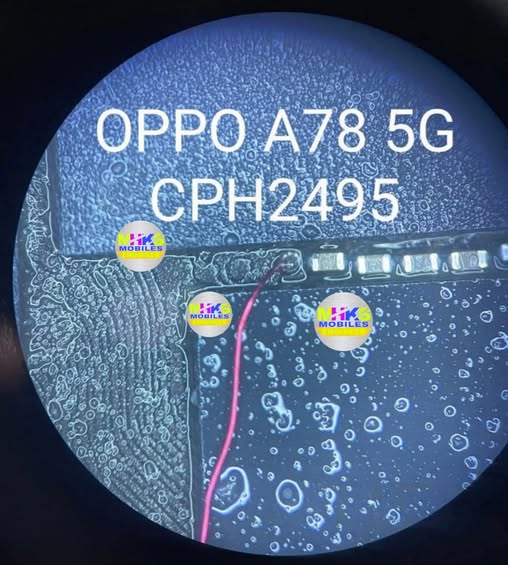
📌 For OPPO A78 5G (CPH2495)
The test point(s) for EDL/BROM are on the motherboard, often near the USB port / chipset area.
After disconnecting battery and exposing the PCB, you locate the marked test pads near critical ICs.
Shorting the pad to ground before connecting USB forces the phone into deep mode for recovery.
⚠️ Important Safety & Practical Notes
❗ Not for casual users: Opening the phone and touching test points can void warranty and risk permanent damage if done improperly.
⚡ Professional tools needed: This is usually done with mobile repair tools like TSM Tool, SP Flash Tool, UMT, CMMTK2, etc. by trained technicians.
🔌 Disconnect the battery first: Always disconnect the battery before shorting test points — otherwise short-circuiting could permanently damage the board.
🛠 Photos/Schematic: Exact pad positions are typically shown in repair schematics or technician guides — these are available in repair forums or service manuals but not usually from official Oppo support.
If you tell me which version you have (4G vs 5G and model code like CPH2565 or CPH2495), I can try to find a diagram or specific pad image showing the exact test point locations.
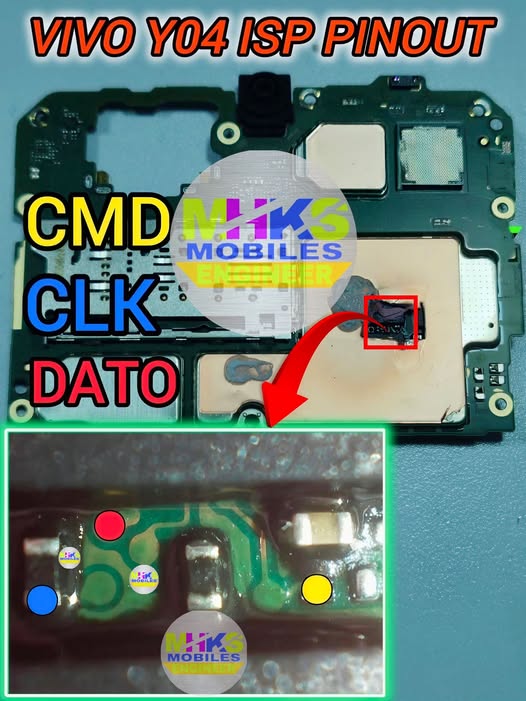
Here’s the ISP (eMMC) pinout info for the Vivo Y04 that technicians use for in-system programming, firmware recovery, FRP bypass, and direct EMMC access with tools like UFI Box, Easy JTAG, Medusa Pro, etc.
🔌 Vivo Y04 ISP (eMMC) Pinout – Typical Points
The ISP pinout on Vivo Y04 isn’t a labeled connector like USB; it’s a set of test pads on the motherboard near the eMMC chip (usually under metal shielding). You must locate and solder these points for direct communication.
Pin Name
Function
CMD
eMMC Command (data/control)
CLK
Clock signal
DAT0
eMMC Data 0 line
VCC / VCCQ
Power supply for eMMC
GND
Ground
These are the essential signals required to communicate with the eMMC chip via most ISP boxes.
📌 What Each Pin Does
CMD (Command) – Sends commands to the eMMC.
CLK (Clock) – Timing reference for data transfers.
DAT0 (Data line 0) – Primary data line used by many tools.
VCC/VCCQ – Supplies voltage to the memory chip (must match correct level, often around 1.8–3.3 V).
GND – Reference ground for signals and power.
📍 Locating ISP Pads
The pads are typically arrayed around the eMMC package on the mainboard.
A microscope or magnifier is strongly recommended to identify exact pads before soldering.
These points are unmarked on most boards, so you often need to refer to board pictures or reference layouts from repair guides/files.
⚙️ Steps to Use the ISP Pinout
Power off phone and disconnect battery.
Clean the board area with IPA alcohol.
Solder very fine wires from the ISP pads to the corresponding pins on your ISP programmer.
Ensure correct mapping of CMD/CLK/DAT0/GND/VCC between phone and ISP tool.
Double-check continuity with a multimeter.
Launch the EMMC software and scan the chip.
🧰 Tools Often Used
UFI Box
Easy JTAG Plus
Medusa Pro
Fine soldering iron and 0.1–0.3 mm wires
Multimeter and magnifier/microscope
⚠️ Important Tips
Do not power the phone from USB while trying to solder the ISP points — keep battery disconnected.
Connect VCC only to the correct eMMC supply pin (mixing power rails can damage the chip).
ISP pad locations vary slightly depending on board revisions — always confirm visually before soldering.
If you want exact board images with labeled ISP pads for the Vivo Y04, I can help find those references too — just let me know!